A stealer log is everything infostealer malware copied from one computer in a single pass: every password the browsers had saved, the cookies holding open sessions, the names, addresses and card numbers typed into forms, the installed software, and a fingerprint of the machine itself. Read as a whole, it describes a person rather than an account. This piece walks through one record a table at a time, says what each part gives away, and ends with what to do when an address of yours turns up in one.
The machine in this piece is invented
Every value below belongs to a composite computer made up for the purpose, and every field is one that real records carry. Call its owner Dana. Dana uses one laptop for work and for everything else, which is the ordinary case and the reason a record like this is worth reading closely.
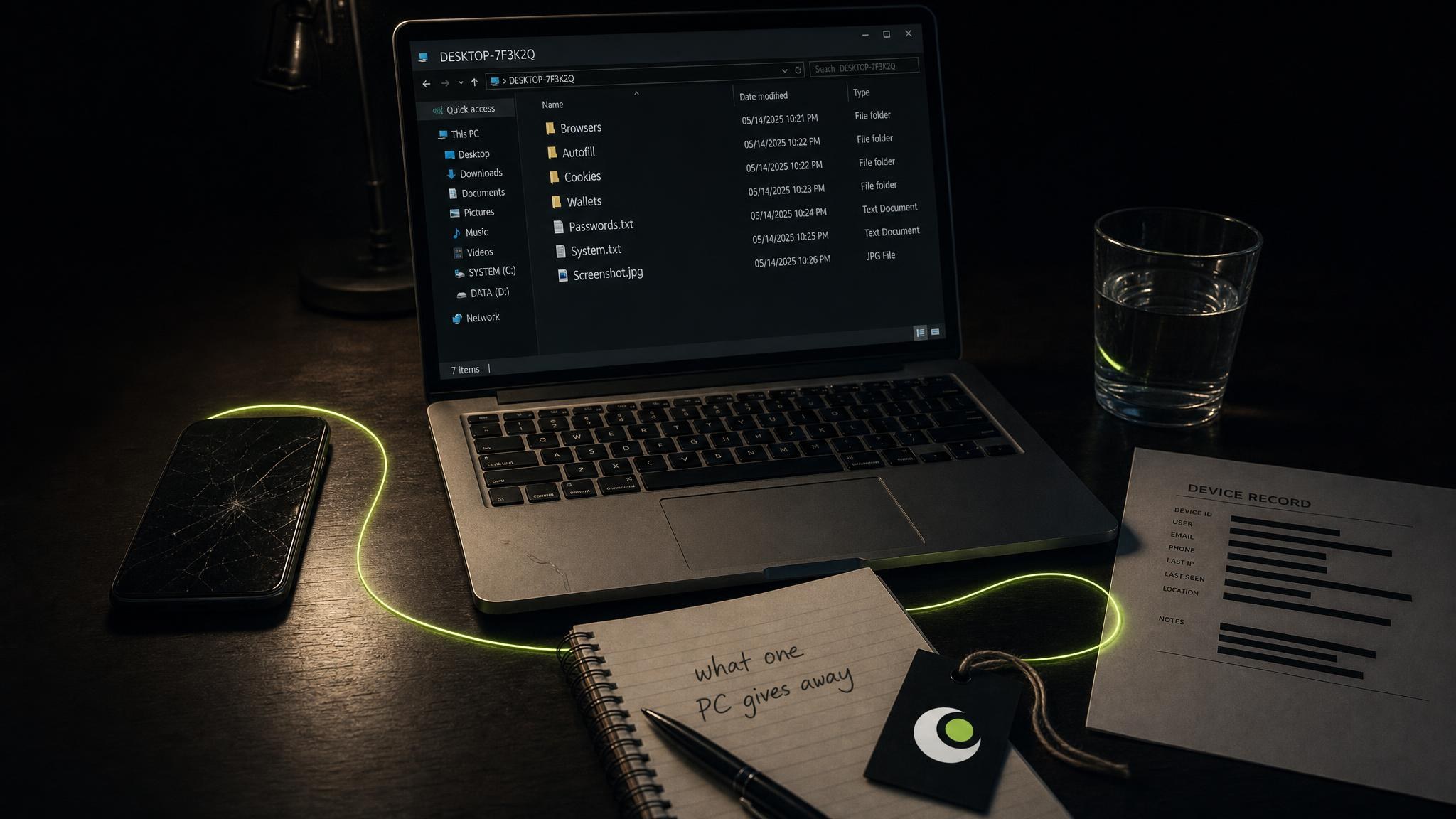
The malware ran once, for a minute or two, and left. What it wrote is an archive: one folder for the machine, holding a passwords file per browser profile, a directory of cookies, a dump of autofill entries and a text file in which the system describes itself. How that archive is produced, sold and resold is covered in stealer logs are the easiest path to a data breach. This piece is about what is inside it.
A device record here reads that archive through thirteen views, nine of them parsed into tables, with the raw files still browsable underneath.
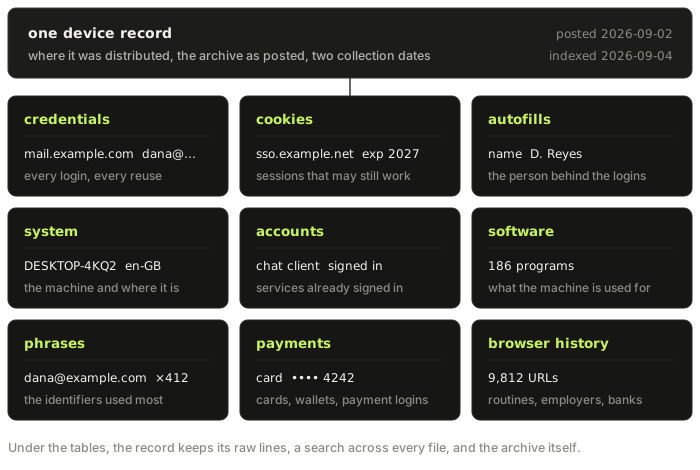
Where the record came from
Before any table, a record says where it was found: where the archive was distributed, the filename it was posted under, the date it was posted and the date it reached the index. Those are collection dates. They say when the archive surfaced, not when Dana's laptop was swept, and the gap between the two can run to months. Nothing in the material names the strain of malware either. A record is evidence about a machine and a moment of publication, and both limits are worth holding on to through everything that follows.
Credentials: every saved login
Dana's record holds 214 saved logins across 163 sites. Each row is a page address, a username or email address and a password, along with the browser profile file it was read from. Most rows are unremarkable on their own: a supermarket, a train operator, two old forums, a streaming service, an energy supplier.
Read together, they are a map of a life. The record counts unique credentials, the domains they belong to and the passwords used more than once, and that last number is the one that matters most. In Dana's case one password opens nineteen sites, including the personal email account that can reset every other one. A breach at a single service exposes one password. A log exposes the whole pattern of reuse at once.
Corporate logins
The same rows, kept when the login domain is not a consumer mail provider, form a separate view. In Dana's record they include the employer's single sign-on page, a supplier portal and an internal wiki. This is the point at which a personal laptop becomes somebody else's security problem: none of those logins was ever on a machine the employer managed, and none of the employer's controls saw them leave.
Cookies: sessions that may still be open
The cookie jar is the part of a log that does the most damage and gets the least attention. A session cookie is what a site hands the browser after a successful sign-in, so that the next page does not ask again. Whoever holds a valid one is, as far as the site can tell, already signed in. Google's description of the problem is that cookie theft happens after login, which is why it walks past the password and the second factor together.
The record lists the jar with duplicates dropped and the latest expiry first. Dana's includes cookies for the personal mailbox, a cloud storage account and the employer's sign-on provider, all with expiry dates still in the future. An expiry date is the most a cookie says about itself. Whether the session behind it is still accepted is up to the site, which is why the response to a log starts with signing out of sessions rather than changing passwords.
Autofills: the person behind the logins
Autofill is the browser remembering what was typed into forms, and people type their lives into forms. Dana's record holds a full name, two home addresses a few years apart, a mobile number, a date of birth and the delivery instructions for a parcel locker.
None of that opens an account directly. What it does is attach a real person to everything else in the log, and make any message aimed at that person far more convincing. A phishing email that quotes a correct address and a recent delivery is a different thing from one that opens with "dear customer".
System information: the machine describing itself
Every log carries a fingerprint written at the moment of capture: the operating system and its version, the hardware, the language and keyboard layouts, the time zone, the computer's name and the user account it ran under, and the network address it reported. Some carry a screenshot of whatever was on the screen.
For the person reading their own record, this is the quickest way to know whether it is theirs. A computer name and a Windows user name are more distinctive than an email address, which can turn up on someone else's machine for any number of innocent reasons. For anyone else reading it, the same fields place the machine in a country and a language, and often say whether it was company hardware or someone's own.
Accounts and software
The accounts view lists signed-in sessions and service accounts detected on the device: chat clients, gaming launchers, cloud drives, the things that stay logged in for months without asking. Each is an account that may never have had its password typed into the browser at all, and so would never appear among the credentials.
The software list is the full inventory of installed programs. It says what the machine is for, and sometimes it says more than that. A game cheat or a cracked utility installed shortly before everything else in the record is not proof of how the malware arrived, but it is usually where the owner should look first.
Phrases: what the record says most often
The phrases view ranks the identifiers that occur most often across every file in the record. It sounds like a statistic and works like a summary. In Dana's record the personal email address comes first by a distance, the work address second and an old gaming handle third.
That ranking is the shortest answer to the question of whose machine this is and which identifiers matter to them. It is also the list of what to search next, because each of those identifiers may lead to accounts the log itself never touched.
Payments: cards, wallets and payment logins
Payment material is found by heuristic across the whole record: saved cards, cryptocurrency wallet files and extensions, chain addresses that appear in files, and logins to payment services. Dana's record holds one saved card, the login for a payment app and a browser wallet extension.
This table is the one with the shortest fuse. A saved card can be used as soon as someone reads it. A wallet whose files left the machine, together with the passwords saved beside them, should be treated as belonging to someone else until its funds are moved to a new wallet created on a clean device.
Browser history
Last comes the history, as an aggregate of the most visited sites and as a list of addresses. In Dana's case it shows a working day spent in the employer's tools, a bank checked every morning, and the forum where the game cheat came from. History rarely adds a new account. What it adds is routine: which services matter, at what times, and what a believable message to Dana would be about.
What a record cannot tell you
A record is a description of one machine at the moment it was swept, and there are four things it does not settle.
- Which malware produced it. Nothing in the material names the strain, so nothing here guesses.
- When the machine was infected. Every date is a collection date. A record posted last month can describe a sweep from last year.
- Whether a password still works. A row shows what was saved, not what is current. Some of Dana's passwords were changed long ago, and some never will be.
- Who was at the keyboard. A shared computer puts several people's lives in one record, and a log taken from a family laptop is a record of the household.
If your address is in one
The order matters more than the speed, though speed matters too.
- Take the machine out of use and reinstall it. Anything still running on it captures new passwords the same way it captured the old ones. The UK's NCSC recommends a factory reset for a compromised device. On a Windows PC that means a reinstall from USB rather than the built-in reset, for the reasons below.
- From a different, clean device, sign out of everything. Start with email, then the accounts whose cookies appear in the record. Most services have a page that lists active sessions and ends them.
- Change the passwords, starting with email. Then every account where a reused password appears, and give each one a password it shares with nothing else.
- Deal with payments. Ask the bank to cancel any saved card, and move cryptocurrency out of any wallet whose files were taken.
- Tell your employer if corporate logins are in it. Their security team can end sessions you cannot reach.
- Expect better phishing. Messages that quote your address, your delivery company or your bank are the likely next step, and deserve suspicion precisely because they sound right.
The full sequence, including second factors and when a monitor helps, is in how to check if your information has been leaked.

Why a Windows PC needs a reinstall from USB
"Reset this PC" is not a clean slate. It rebuilds Windows from files kept on the same drive and runs from a recovery environment stored in a partition of its own, and malware that ran with administrator rights can tamper with all of it. Code planted in the recovery partition, the boot partition or the boot sector survives a reset and comes straight back. A reinstall from USB with every partition deleted leaves it nowhere to hide.
- Make the USB on a different computer. Use Microsoft's installation media tool on a machine you trust, so nothing on the infected PC touches the installer.
- Copy off documents, not programs. Save the photos and files you cannot replace. Leave behind programs, installers, scripts and browser profiles, which can carry the infection back.
- Delete every partition during setup. When Windows Setup asks where to install, delete each partition on the drive, including the recovery and system partitions, and install onto the empty space. Setup creates the partitions it needs.
- Update before you sign in to anything. Install Windows updates first, then reinstall software from each vendor's own site rather than from copies saved on the old machine.
A Mac does not need the same treatment. Erasing it and reinstalling macOS from Recovery is enough.
Questions people ask
What is in a stealer log?
Everything the malware could copy in one pass: saved passwords from every browser profile, cookies for signed-in sessions, autofill entries such as names, addresses and card numbers, a list of installed software, and a fingerprint of the machine including its name, language, time zone and network address. Some also hold wallet files, browsing history and a screenshot.
How do I know whether a stealer log came from my computer?
Look at the system information rather than the email address. The computer name, the Windows user name, the language settings and the mix of saved logins together identify a machine far more reliably than one address, which can appear on someone else's computer for innocent reasons.
Is resetting Windows enough to remove an infostealer?
Not reliably. "Reset this PC" rebuilds Windows from files on the same drive, and malware that ran with administrator rights can hide in the recovery and boot partitions the reset leaves in place. Reinstall Windows from a USB drive made on a different computer, and delete every partition during setup.
Does changing my password fix it?
Not on its own. A log usually includes session cookies, and a session that is still valid does not need the password. Sign out of active sessions from a clean device first, then change passwords, and do not do either from the machine that was infected.
Can a stealer log tell me when I was infected?
No. The dates on a record are when the archive was posted and when it was indexed. The sweep itself can have happened weeks or months earlier, so a recent record is not evidence of a recent infection, and an old one is not evidence that the danger has passed.
Why are my work logins in a log from my personal computer?
Because the browser saved them when you signed in to work from that machine. To the malware a work login is just another saved password. It is the most common way a company's credentials end up in logs, and the reason to tell your employer when it happens.
The free check searches device records alongside breach records by email address, username or domain, with no account needed. If a record comes back, the system information will tell you whether it is yours.